Summ Review: Strong on DeFi and Multi-Country Reports, Pricier Than Koinly Where It Counts
Summ, formerly Crypto Tax Calculator, is built for people with messy on-chain histories and more than one tax jurisdiction. We tested what its plans cost, where it beats Koinly and where it does not.

The verdict
Summ is a good fit for readers whose crypto history is mostly DeFi, bridges and several wallets, and who may owe tax in more than one country. It is not the cheapest route: the plan that unlocks on-chain tracking starts at $99, and Koinly lets you track the same wallets for free before you pay. Simple exchange-only traders will overpay here.
Best for DeFi-heavy investors with multi-country tax filings
Pros
- Over 3,500 integrations, including wallets, chains and protocols
- Tax loss harvesting and an audit report on the Investor plan
- Human support praised by reviewers and a 4.6 Trustpilot score
- Country-specific reports for the US, UK, Australia, Canada, NZ and EU
Cons
- No tax reports on the free plan, and on-chain tracking needs $99 or more
- Complex DeFi still needs manual review; one tester saw wrong pool labels
- Your tax country is fixed after setup, which hurts people who move
- Pricing runs higher than Koinly once you pass roughly 1,000 transactions
If your crypto year is a few buys on an exchange, close this tab and use whichever tax tool is cheapest. Summ is for the other kind of reader: someone who bridged between chains, farmed on three protocols, moved coins across wallets and may owe tax in two countries. For that person the question is not price, it is whether the software can read the history at all.
We loaded wallets from several chains into Summ, worked through its import flow and read what independent testers have found. The short answer is that it handles that kind of history better than most, and still asks you to check its work.
What you pay, and what each tier unlocks
Summ was Crypto Tax Calculator until its rebrand, and the pricing page still shows the old logic: you buy a tax year by transaction count. The page we captured lists $49, $99 and $249, with a fourth $499 tier reported by Fortunly and Milk Road.
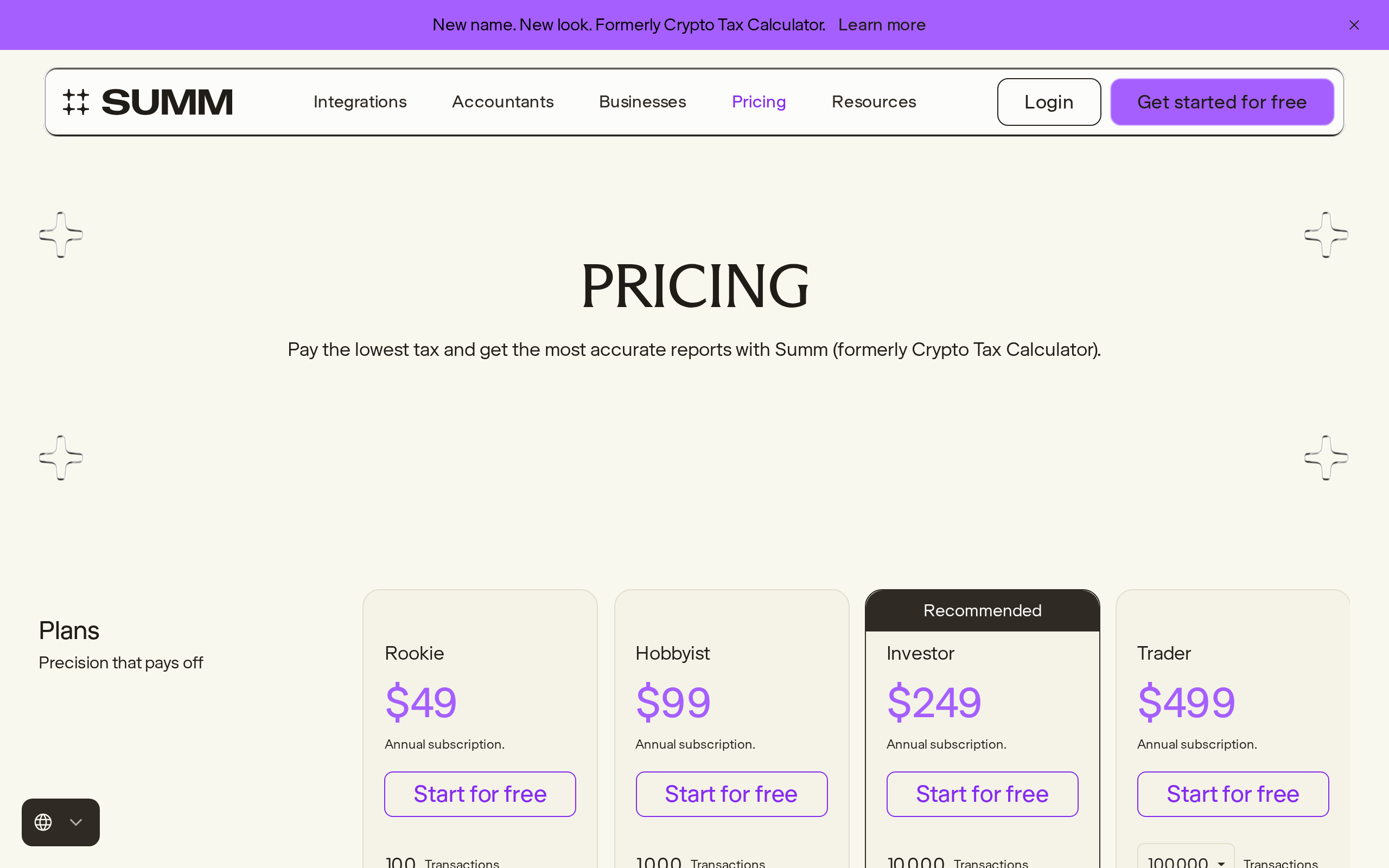
Rookie, $49: up to 100 transactions, portfolio tracking and reports.
Hobbyist, $99: up to 1,000 transactions, and the first tier that tracks automated on-chain and smart contract activity.
Investor, $249: up to 10,000 transactions, tax loss harvesting and an audit report.
Trader, $499: up to 100,000 transactions and priority support.
Read that second line twice. If your life is DeFi, the $49 plan is a trap: it counts transactions but will not follow contract interactions. The realistic entry price for our reader is $99, and most active users land on $249. There is a free plan, but it produces no tax report.
Where it earns its price: integrations and DeFi
The integrations page claims more than 3,500 supported wallets, exchanges and protocols. We cannot verify every one, but the long tail is real: the chains and protocols we tried were recognised without a CSV detour.

Reviewers who focus on DeFi agree on the strength. Milk Road lists staking, liquidity pools, bridges, wrapped assets and airdrops as covered, and Finder adds NFTs. The tax logic is where Summ separates from simpler tools: the Investor plan includes a minimisation algorithm and loss harvesting suggestions, which only matter if you have gains to offset.
Where it still needs you
Do not read "supports DeFi" as "gets DeFi right". One CPA who tested it in a long write-up found liquidity pool deposits treated as taxable sales in some cases, producing phantom gains. That report also disagrees with Summ's integration count and misses features Summ lists, so we weigh it as one data point, not a verdict. Our own experience matched the milder version: the labels were mostly right, and a handful of multi-step transactions needed a manual fix.
Two other limits are worth knowing before you pay. Milk Road notes that your tax country is locked once you choose it, which is awkward if you relocate. And Summ has no mobile app, so everything happens in the browser.
Summ against Koinly
Koinly is the comparison most readers make, and we cover it in our Koinly review. The trade is clear. Koinly lets you add everything and see a preview for free, with plans starting at $49 per tax year. Summ asks for money earlier in the process if you need on-chain tracking. Koinly's own comparison page claims it covers more countries and that Summ is less reliable at high volume, but that is a competitor describing a rival, and it conflicts with the broader regional list the independent reviews give for Summ.
On support, Summ has the edge in what we read: Finder and others praise fast human replies, and the Trustpilot score is 4.6. The help centre is organised around the jobs you actually do: importing transactions, subscriptions and the accountant portal.

Who should pay, and who should not
Pay for Summ if you have a DeFi-heavy history, more than one wallet ecosystem and a filing obligation in a country it supports natively. The Accountant Portal also helps if you pass your files to a professional.
Skip it if you trade on one or two exchanges, if you are under a few hundred transactions with no on-chain activity, or if you want to see a free preview of your gains before committing. This is tax software, not tax advice: check any report against your own country's rules or with a qualified accountant before you file.
Our rating is a 7.5: strong where it is aimed, expensive where it is not.
Specifications
- Rookie plan
- $49/yr, up to 100 transactions
- Hobbyist plan
- $99/yr, up to 1,000 transactions, on-chain tracking
- Investor plan
- $249/yr, up to 10,000 transactions, tax loss harvesting
- Trader plan
- $499/yr, up to 100,000 transactions, priority support
- Integrations
- 3,500+ (Summ integrations page)
- Tax regions
- US, UK, Australia, Canada, NZ, EU, generic elsewhere
- Mobile app
- None, web only
As published by Summ (formerly Crypto Tax Calculator) when we tested it.